How to automate print procurement: a guide for commercial print businesses
Print procurement is one of the most overlooked opportunities for automation in commercial print shops. Most PSPs still manage supplier orders manually: tracking stock levels in spreadsheets, sending emails to suppliers, reconciling invoices by hand, and holding inventory that ties up working capital. This manual process is slow, error-prone, and expensive. Automated procurement using print procurement software transforms this bottleneck into a competitive advantage by triggering orders automatically, optimizing stock levels, and freeing up capital. Here's how to do it.
The problem with manual print procurement
Manual procurement creates three critical problems. First, it's invisible. You don't know your true stock position across materials, ink, and components. Someone checks inventory sheets periodically (or not at all), notices stock is low, and then rushes to place an order. By then, you're paying rush fees or the supplier is out of stock and you're scrambling to find alternatives.
Second, it's expensive. Emergency orders, rush shipping, and safety stock (extra material you keep just in case) all inflate your material costs. You're also holding more inventory than necessary on the shelf, which means storage costs, obsolescence risk, and capital locked up that could be invested elsewhere. ESP Colour freed up 300k in working capital by implementing automated procurement that optimized their material holdings.
Third, it's a time sink. Your procurement team (or whoever is tasked with ordering) spends hours managing email chains, tracking delivery dates, and resolving discrepancies. This is billable time that could be spent on higher-value work like supplier relationships, cost negotiation, or analyzing waste.
How automated print procurement works
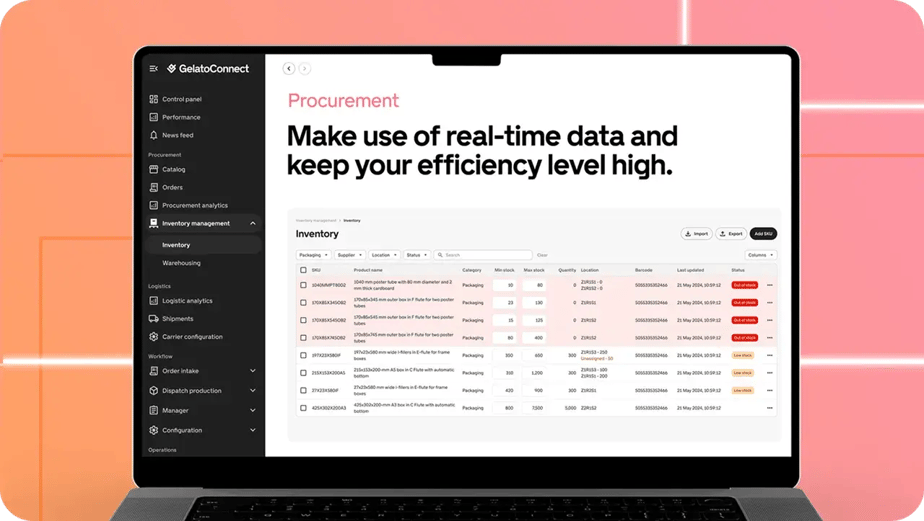
Automated procurement software integrates your MIS (Management Information System) with your supplier systems. The MIS tracks stock levels in real time as jobs consume materials. When inventory falls below a threshold you set, the system automatically generates a purchase order and sends it to your supplier. If your supplier offers EDI or API connections, the order transmits automatically. If not, the system creates a digital order ready for one click to send. This is core to what modern print management software does.
This automation has three immediate benefits. First, you eliminate stockouts because the system reorders before you run out. Second, you reduce safety stock because you're no longer guessing. The system knows exactly how much you need and when. Third, you free up procurement staff to focus on negotiating better rates, evaluating new suppliers, or analyzing which materials have the best margin. For print shops managing complex procurement workflows, choosing the right print shop management software is the first step toward automated procurement.
The software also tracks supplier performance. How often does this supplier deliver on time? What's their quality like? How responsive are they to problems? This data lets you optimize your supplier mix and negotiate better contracts based on actual performance, not intuition. When combined with proper MIS infrastructure, these insights drive continuous improvement in your supply chain.
What to automate first
Start with your highest-volume, lowest-complexity materials. If you print 10,000 sheets of 80lb white text stock per week, that's a perfect candidate for automation. The demand is predictable, the item is standardized, and automation saves real time and reduces waste. Set up automatic reorders at a level that covers about two weeks of average consumption plus a safety buffer.
Next, automate specialty materials that have long lead times. If specialty coated stock takes three weeks to arrive, you need to order based on forecast, not just consumption. Automated procurement with a slightly longer lead-time threshold prevents you from ever running short.
Ink and consumables are also good candidates. These are high-frequency orders that are typically small volume. Automating them means your team doesn't spend time on these routine transactions.
Materials with volatile demand are harder to automate and should come later. If you print custom apparel in varying quantities and your designers choose different fabrics for different jobs, you'll need more sophisticated forecasting. Some MIS platforms include predictive analytics that learn your ordering patterns and adjust thresholds accordingly.
Integration with your current systems
Successful automation requires connecting your MIS to your supplier systems. Modern platforms support multiple integration methods. EDI (Electronic Data Interchange) is the traditional standard and most large suppliers support it. APIs are newer and more flexible. Some suppliers still require manual data entry, which means less automation, but even here you can reduce friction with tools that prepare orders for quick submission.
You'll also want to integrate your accounting system. When an automated order is placed, your financial records should update automatically so you're not managing inventory and accounts payable separately.
The best platforms make these integrations straightforward. You shouldn't need a developer to set up automated procurement. It should be point-and-click configuration.
Key takeaway
Automated procurement is one of the highest-ROI automation opportunities in print. It eliminates stockouts, reduces safety stock, frees up working capital, and gives your team hours back each week. Start with high-volume, predictable materials and expand from there. The combination of real-time inventory visibility and automatic ordering is transformative. Companies that implement it typically see payback in weeks, not months.
Ready to automate your procurement? GelatoConnect's MIS platform integrates with leading suppliers and automatically manages your stock. Explore how GelatoConnect automates procurement for PSPs.