The gap between the best-performing print service providers and the rest of the market is not a design gap, and it is not a marketing gap. It is a production gap. PSPs operating on GelatoConnect run under 0.35 percent production error rates, compared with a 1.5 percent industry average, and achieve 98 percent on-time dispatch against an 81 percent industry benchmark. Those outcomes do not come from a prettier product catalog or a slicker user interface. They come from whether your web-to-print platform is genuinely connected to production, or stitched on top of it. This web-to-print software buyer's guide lays out the ten criteria that predict those outcomes, gives you a 20-question RFP template you can copy into a document today, and shows you how to score and interpret vendor answers with confidence.
If you are a PSP owner, CFO, IT director, or procurement lead running a formal evaluation, the goal of this guide is simple. Separate the platforms that will scale your B2B program from the ones that will quietly become another operational cost center.
Ten criteria that matter in a web-to-print software buyer's guide
Every evaluation should test these ten dimensions. In that order. The first criterion is by far the most important, because it determines whether the rest of the platform works as a system or as a set of disconnected features.
1. Native production integration, not a plugin or a sync connector
The single biggest predictor of downstream error rates and margin is whether the web-to-print platform is part of your production system or connected to it through a sync. Plugins, middleware, and nightly exports all create re-entry, data drift, and manual handoffs. Native integration means the product catalog, pricing, stock, and fulfillment status are the same records the production floor sees. Ask how orders physically move from the storefront into production, and what the handoff looks like on a failed job.
2. Unlimited portals without per-site fees
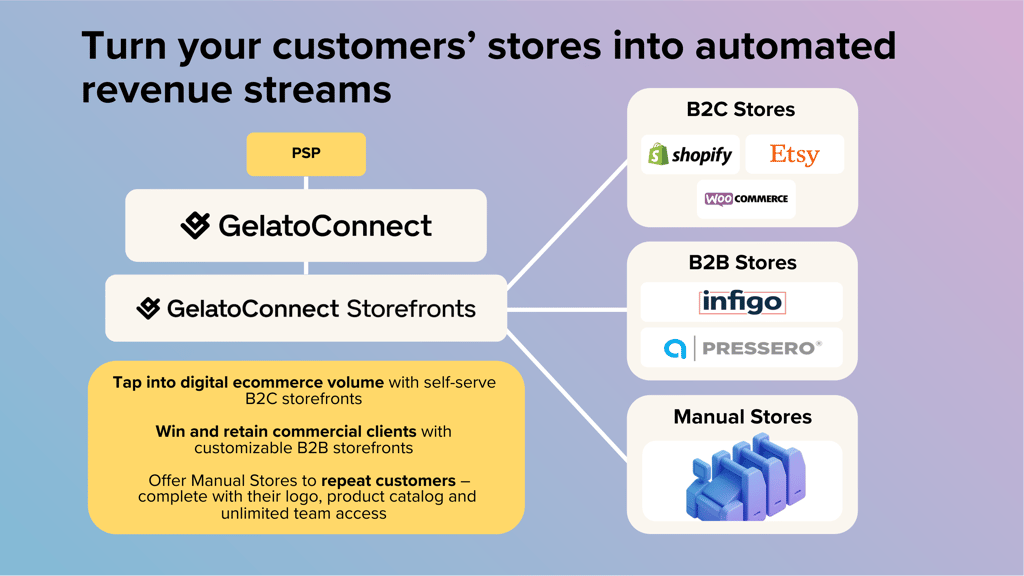
Legacy platforms charge per storefront. That model caps your growth and forces you to filter which corporate clients deserve a portal. Modern platforms let you launch unlimited branded portals with no per-site license cost, because the portal is a configuration, not a deployment.
3. Self-service edits to catalog, pricing, and branding at zero cost
If your current vendor charges for logo changes, price updates, or product additions, you already know the cost. A modern platform lets your team edit catalog, pricing, and branding through an admin interface, with no tickets and no professional services fees.
4. Template locking with editable personalization
Corporate clients need controlled personalization, not open design. The platform must let you upload InDesign, PSD, and PDF files, lock brand-critical fields, and open up only the elements the client is allowed to edit, such as name, title, or regional phone number. Output must be print-ready without file fixing at the production end.
5. Bulk catalog import from CSV, InDesign, PSD, and PDF
Moving a catalog of 500 SKUs into a portal one at a time is not a setup, it is a project. The platform should ingest CSVs for structured data and accept design files in their native formats, mapping metadata automatically.
6. Enterprise checkout with PO fields, approval workflows, and department routing
B2B is not B2C with a different logo. Corporate clients need purchase order capture on every line, spending thresholds, multi-step approval chains, and department or cost center routing. These are not optional, and they are not configurable after launch without breaking existing orders.
7. Real-time order tracking for each client
Your corporate clients will ask where their order is. If the answer requires a phone call to your CSR team, you have already lost the margin advantage of the platform. Each client portal must surface real-time status at the order and line level.
8. Machine-agnostic production support
A platform that only works with one press vendor locks your capital planning to that vendor. The web-to-print software should support 100 or more printer types across digital, offset, large format, labels, packaging, and apparel, so that the portal is not obsolete the next time you invest in production equipment.
9. Global shipping with volume-aggregated carrier pricing
Shipping cost compounds. A platform connected to an aggregated carrier network delivers 10 to 25 percent lower shipping costs through 80 or more carrier partners and local production across 32 countries. Ask how the platform routes an order from a client's London HQ to their Sydney office, and what that shipment costs compared with your current carrier contracts.
10. Predictable, transparent pricing with no renewal surprises
Per-user fees, per-portal fees, per-transaction fees, and per-API call fees are how legacy vendors make your successful growth expensive. Demand flat, transparent pricing that scales with your business, not with every new client win.
The questions to put in your RFP
Those ten criteria translate into specific questions. The template below is structured into five categories. Copy it into your RFP document, send it to every vendor on your shortlist, and require written answers. Verbal commitments do not survive implementation.
The 20-question web-to-print RFP template
Platform architecture (5 questions)
- Is your web-to-print platform natively part of a production MIS or ERP, or does it connect through an external integration, plugin, or sync connector? Describe the exact mechanism by which orders reach production.
- Can a single platform instance host unlimited client storefronts, or is each storefront a separate deployment or instance? List any per-storefront fees.
- What is your platform's uptime SLA over the past 12 months, and how is it measured?
- Describe your multi-tenancy model, including how client data, branding, pricing, and permissions are isolated.
- What is the technology stack of the platform, and when was it last re-architected?
Storefront setup and branding (4 questions)
- How long does it take to launch a new client storefront, from kickoff to go-live? Provide a written timeline for a standard deployment.
- Can our team edit storefront branding, logos, themes, and custom domains without vendor professional services, and without a ticket? Describe the admin interface.
- Do you support white-label custom domains per client, and is this included in base pricing?
- Provide three customer references who launched a new storefront in under one week, with contact details.
Catalog and pricing management (4 questions)
- Describe bulk catalog import methods, including supported formats (CSV, InDesign, PSD, PDF) and the time required to import 500 SKUs.
- Can our team set contracted, per-client pricing without vendor support? Describe the pricing configuration interface.
- Explain your template locking capabilities, including the ability to lock and unlock specific fields in InDesign and PSD files.
- How is catalog and pricing data kept in sync with our production system? Describe the data flow and any delays.
Order workflow and production integration (4 questions)
- How does an order placed in a storefront reach production? Describe the path, the data structure, and any manual steps.
- What approval workflows do you support, including multi-step chains, spending thresholds, and department routing?
- Do you capture PO numbers, cost centers, and business units at the line level on every order?
- What real-time order status visibility do client users see in the portal, and what data drives it?
Commercial terms and SLAs (3 questions)
- Provide your full pricing structure, including base license, per-user, per-storefront, per-transaction, per-API call, and implementation fees.
- What are your contract renewal terms, including price escalation clauses and termination notice periods?
- List every third-party fee our end clients or we will incur, including payment processing, shipping, and carrier surcharges.
Scoring and comparing vendor answers
Score each of the 20 answers on a 1 to 5 scale, where 1 is evasive or non-compliant, 3 is adequate, and 5 is a clear, specific, written commitment. Weight the categories by what actually moves your P&L. A reasonable starting weight is 35 percent for platform architecture, 25 percent for order workflow and production integration, 15 percent for commercial terms, 15 percent for catalog and pricing, and 10 percent for storefront setup. Architecture and production integration carry the highest weight because they determine whether the platform delivers the 98 percent on-time dispatch and sub-0.35 percent error rates that translate into margin. Any vendor scoring below 3 on question 1 or question 14 should drop off the shortlist, regardless of their total.
Red flags in vendor responses
Three patterns predict post-sale pain. First, the word "integration" used without a mechanism. If a vendor cannot explain, in writing, exactly how orders move from their platform into your production system, the answer is a sync job and the cost will be re-entry. Second, "professional services required" attached to basic configuration, such as launching a storefront, editing a catalog, or changing pricing. That is a future invoice, not a product. Third, pricing structures with per-user, per-storefront, per-transaction, and per-API call fees stacked together. That is a platform designed to make your success expensive, and it will become the reason you evaluate again in three years.
Why the next 12 months matter
Corporate clients are shortening their vendor lists and demanding portal-led ordering with real-time status, approval workflows, and personalization. PSPs who run this guide, send the RFP, and select a genuinely production-connected platform will consolidate that demand. PSPs who stay on disconnected legacy portals will spend the next cycle managing per-instance deployments while a smaller competitor across town wins the account on a branded, production-integrated storefront launched in hours.
Explore GelatoConnect
- GelatoConnect Store Link: Web-to-Print: see how the product works end to end.
- 7 signs you've outgrown your web-to-print platform
- See GelatoConnect in action: walk through the platform live.
Frequently asked questions
What is the most important criterion in a web-to-print evaluation?
Native production integration. Whether the platform is part of your production MIS or connected to it through a sync layer is the single biggest predictor of downstream error rates, on-time dispatch, and margin. Vendors scoring below 3 out of 5 on this criterion should drop off the shortlist regardless of other strengths.
How should I score vendor RFP responses?
Score each of 20 RFP answers on a 1 to 5 scale, where 1 is evasive and 5 is a clear, specific, written commitment. Weight platform architecture at 35 percent, order workflow and production integration at 25 percent, commercial terms at 15 percent, catalog and pricing at 15 percent, and storefront setup at 10 percent.
What counts as a red flag in a vendor RFP answer?
Three patterns predict post-sale pain: the word "integration" used without a concrete mechanism, "professional services required" attached to basic configuration, and pricing stacks that combine per-user, per-storefront, per-transaction, and per-API-call fees. All three make successful growth expensive on your side.
How many portals should a modern platform support without per-site fees?
Unlimited. Legacy per-storefront licensing caps growth and forces PSPs to ration portal access. Modern platforms let you launch unlimited branded storefronts because the portal is a configuration, not a deployment.
What pricing model should I demand from a web-to-print vendor?
Flat, transparent pricing that scales with your business, not with every new client win. Per-user fees, per-portal fees, per-transaction fees, and per-API-call fees stacked together are how legacy vendors make your success expensive. Ask for a complete fee schedule in writing as part of the RFP.
What platform outcomes should the RFP verify?
Under 0.35 percent production error rate versus a 1.5 percent industry average, 98 percent on-time dispatch versus 81 percent, 10 to 25 percent lower shipping costs through aggregated carrier networks, 85 percent fewer stockouts, and 25 to 100 percent growth without added headcount. Ask vendors to back each claim with customer data.