Bennett Graphics, a print service provider, reduced production waste from 41 percent to 10 percent, cut packaging and dispatch time by 80 percent, and gained a real-time production KPI dashboard after moving to GelatoConnect. That is what a modern platform should be doing for your business right now.
Most PSPs stay on a legacy platform long past the point where it is serving them. The reason is not that the platform works. The reason is that switching feels scarier than the status quo. A migration sounds like downtime, lost orders, angry clients, and a new tool the team has to learn. So the per-edit fees keep coming. The support tickets keep sitting. Another renewal doubles the bill.
If you are reading this, you already know when to switch web-to-print platform matters: when the platform is costing you more in lost margin, lost agility, and lost clients than the switch ever would. Below are the seven signs it is time, and a migration playbook that keeps production running during the move.
When to switch web-to-print platform: the seven signs
1. You pay for every small change to your own storefront
Your client asks for a color tweak on their portal, and you log a ticket with your vendor. Two weeks later, you get an invoice. Change the header image, one price. Add a new product category, another. Move a button, another still. The portal is nominally yours, but every edit routes through someone else's queue and someone else's price list. A modern platform gives the admin role to you. You make changes in minutes, you make them yourself, and you do not pay for the privilege.
2. Support tickets sit for weeks
Something breaks on a Tuesday. You open a ticket. You follow up on Thursday. You follow up again the next Tuesday. Meanwhile, a client cannot complete an order. The platform was built on a stack that does not get the engineering hours it used to, and support is triaged accordingly. In a production business, a week of waiting is a week of lost orders. The bar should be same-day resolution on anything that blocks an order.
3. "Unlimited storefronts" comes with a per-site upgrade fee
The contract said unlimited. The invoice says otherwise. Each new corporate client triggers a setup fee, a deployment cost, a custom-domain add-on, and sometimes an annual hosting charge per site. The model was designed for a world where every storefront was a separate deployment. That is no longer how modern software works. Launching a new client portal should be a configuration, not a deployment, and should be priced accordingly.
4. Product onboarding is measured in days per SKU
Setting up a new SKU means exporting from one system, mapping fields in a spreadsheet, re-uploading to the portal, and manually entering pricing. Multiply that by hundreds of products per corporate client. Your catalog team spends more time loading products than selling them. A modern platform imports products and contracted pricing directly from your production system. Setup drops from days per SKU to minutes.
5. Orders from your portal are re-keyed into production
A client submits an order through your storefront. Someone on your team opens the order, copies the specs, and types them into your production system. Another handoff, another chance for an error. The average PSP runs on four or more disconnected systems, and more than 50 percent of customer requests still live in spreadsheets. Orders should flow from your storefront directly into production, with no re-entry and no manual handoff.
6. Your pricing auto-doubles on renewal
You signed a three-year contract at one price. Year four arrives, and the renewal quote is double. The vendor knows your team has built workflows on the platform, trained clients on the URL, and memorized the admin UI. The switching cost, from the vendor's perspective, is what gives them pricing power. But the switching cost is only real when the migration path is painful. When it is not, the renewal leverage disappears.
7. Your platform does not connect to your production workflow
This is the one that costs the most. The portal lives in one system. Procurement lives in another. Production scheduling lives in a third. Logistics lives in a fourth. Every join between them is manual. Margin leaks at every handoff. A modern web-to-print platform is built inside the production workflow, not bolted to it. Every order carries through with its specs, pricing, and delivery details intact.
What a modern web-to-print platform looks like
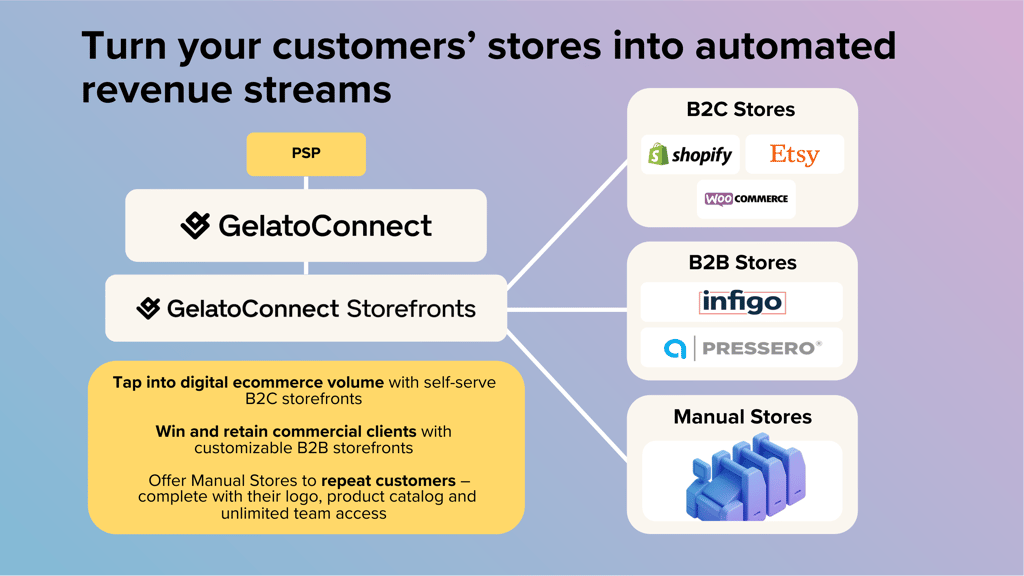
The baseline has moved. A modern platform is native to the production system, not connected to it. Edits happen in the admin UI with zero developer involvement. Storefronts are configurations, not deployments, so there is no per-site upgrade fee and no month-long launch cycle. Product catalogs import from the production side once, and contracted pricing per client flows through automatically. Orders cross into production without re-keying. Approval workflows, PO capture, and department-level ordering are built in.
The outcome is not theoretical. Across GelatoConnect customers, PSPs see 10 to 25 percent lower operational costs, 25 to 100 percent revenue growth without extra hiring, production error rates under 0.35 percent compared with a 1.5 percent industry average, 98 percent on-time dispatch compared with 81 percent, and a 3 to 7 percentage point improvement in gross margin.
The migration playbook: switching without downtime
The fear is downtime. The fix is running both platforms in parallel until the new one is proven. Here is an eight-week playbook your team can run without stopping production.
- Weeks 1 to 2: Audit and export. Inventory your live portals. Export product catalogs, pricing tiers, customer lists, and template files. Pull your current contract to confirm renewal dates and any early-termination terms. Document the edits you have made to each storefront. This becomes your migration scope.
- Weeks 3 to 4: Stand up the new platform in parallel. Configure your GelatoConnect account. Import products and contracted pricing from your production side. Migrate your top three clients, the ones with the simplest catalogs and the strongest relationships. Keep the legacy platform live for everyone else.
- Weeks 5 to 6: Cut over the remaining clients. Move the rest of your corporate clients onto the new platform in waves. Keep both systems running in parallel for 30 days. Every order that comes through the legacy platform gets a follow-up email with the new portal URL.
- Weeks 7 to 8: Retire the legacy contract. Confirm all clients are ordering through the new platform. Close out the legacy portal and cancel the contract on the next renewal date. Notify clients of the change with a simple transition email. Track that every order is landing in production without re-entry.
The cutover is boring by design. The platform swap happens in the background while your clients keep placing orders.
What to measure after 90 days
Agree your success metrics up front and measure them at the 90-day mark. Five numbers matter.
- Quote turnaround time from request to sent quote, benchmarked against your legacy baseline.
- Cost per storefront change, which should drop to zero because your team now makes the edits.
- Time to launch a new client portal, targeting hours instead of weeks.
- Orders manually re-entered into production, targeting zero.
- Support resolution time for any issue that blocks an order.
If these numbers move, the migration worked. If they do not, you have a concrete list of what is still broken and a vendor who is accountable for fixing it. The point of switching is to get measurable outcomes, not a different logo on the login screen.
Why now
Every month on a platform that charges for every edit is a month of lost margin. Every ticket that sits for two weeks is an order your client remembers. Every renewal that doubles is a vendor pricing in your fear of change.
The migration path is boring. The platform is already in production at PSPs running the same catalogs, the same corporate clients, and the same production systems you do. The question stopped being whether to switch. It is what it is still costing you to wait.
Explore GelatoConnect
- GelatoConnect Store Link: Web-to-Print: see how the product works end to end.
- How web-to-print software unlocks scalable production
- See GelatoConnect in action: walk through the platform live.
Frequently asked questions
When should a PSP switch web-to-print platforms?
When any of the seven signs in this article are present: paying per-change fees, weeks-long support tickets, per-storefront surcharges despite "unlimited" contracts, day-long SKU onboarding, manual order re-entry, doubling renewals, or a platform disconnected from production. Each sign alone is a trigger. Multiple together mean the platform is already capping growth.
How long does a web-to-print migration take?
Eight weeks is a realistic timeline with zero downtime. Weeks 1 to 2 audit and export catalogs and contracts. Weeks 3 to 4 stand up the new platform in parallel and migrate the top three clients. Weeks 5 to 6 cut over the rest in waves while running both systems in parallel. Weeks 7 to 8 retire the legacy contract.
What outcomes should I expect after switching?
Across GelatoConnect PSPs, 10 to 25 percent lower operational costs, 25 to 100 percent revenue growth without extra hiring, production error rates under 0.35 percent versus the 1.5 percent industry average, 98 percent on-time dispatch versus 81 percent, and a 3 to 7 percentage point improvement in gross margin.
What does a modern web-to-print platform actually include?
Native production integration (orders flow straight into the production workflow, not through a sync), zero-code self-service edits, unlimited branded portals without per-site fees, template locking with editable personalization, bulk catalog import, enterprise checkout with PO fields and approval routing, and machine-agnostic production support.
How do I avoid disruption during the switch?
Run both platforms in parallel for 30 days after cutover. Move your top three clients first to validate the workflow, then fan out. Every order that lands in the legacy system during parallel gets a follow-up email with the new portal URL. Cancel the legacy contract only after every client is actively ordering in the new platform.
What should I measure at day 90 after switching?
Quote turnaround time, cost per storefront change, time to launch a new client portal, orders manually re-entered into production, and support resolution time. These five numbers are the clearest indicators that the migration worked.